


💊 Pill of the Week
Imagine you’re a news editor trying to understand a breaking story. You get a single field report. To really cover it, you need to know the “who, what, where” (the key facts), the “so what” (the summary), and the “how do people feel” (the public sentiment) all at once. Asking an AI to do this sequentially—first find the facts, then write the summary, then analyze the sentiment—is slow and inefficient.
This is where Parallelization comes in. It’s a workflow pattern that transforms your AI from a single-track worker into a multi-talented team, tackling multiple, independent tasks at the same time.
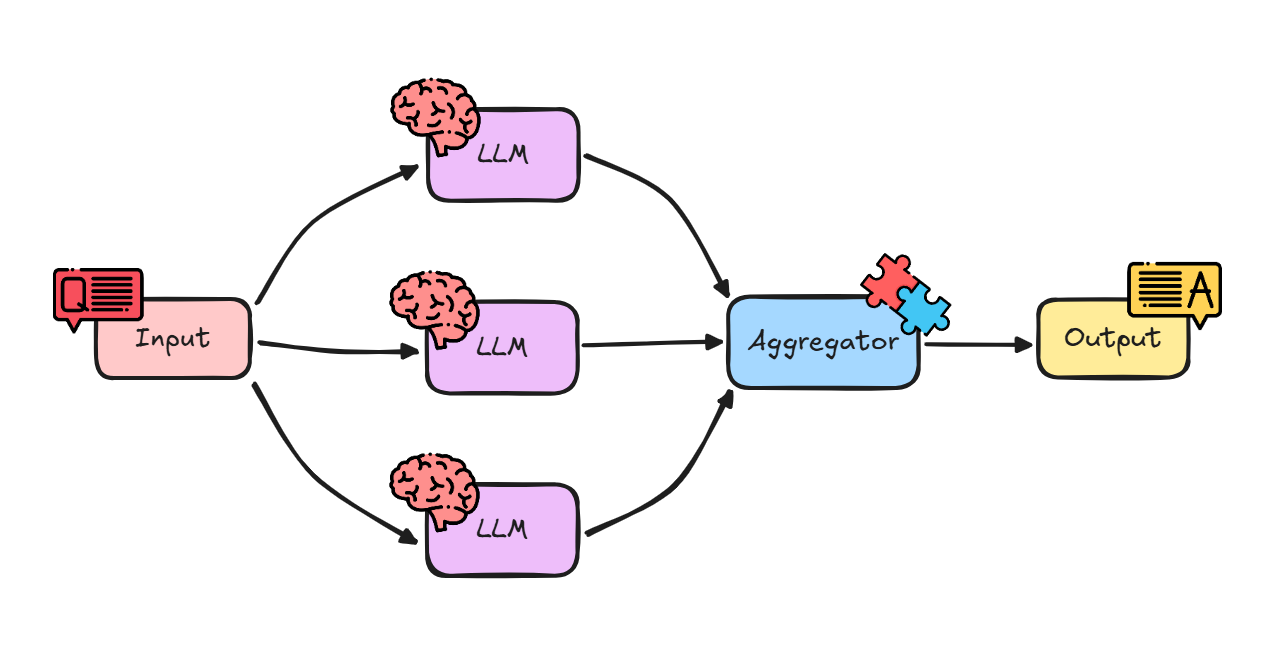
Think of it like cooking a big meal. You don’t cook the chicken, then wait for it to finish before starting the potatoes, then wait again before making the salad. You put the chicken in the oven, put the potatoes on to boil, and chop the salad all at the same time. They all finish around the same time, and dinner is ready much faster.
In the previous article we covered the 5 main workflows when working with LLMs:


Also, previously we had covered the first, most basic one: “prompt chaining”:

In this issue we will:
Define the “Parallelization” workflow pattern and explain its key benefits.
Explore how to implement this pattern using LangChain.
Build a step-by-step example that analyzes a news article in three different ways simultaneously. 💎 With all the code + notebook! 💎
Let’s begin!
Why is Parallelization so Effective?
Speed and Efficiency: This is the biggest win. Instead of adding up the time for each task (Task A + Task B + Task C), the total time is only as long as your slowest task. This dramatically reduces latency, especially for complex queries.
Rich, Structured Output: You can get a variety of different analyses from a single input, all neatly packaged into one structured object (like a dictionary or JSON).
Task Isolation: Each “branch” of the parallel workflow runs independently. A failure or a poor-quality result in one branch (e.g., failing to find any “key phrases”) doesn’t stop the other branches (like “sentiment analysis”) from completing successfully.
This pattern is the perfect choice for any scenario where you need multiple different insights from the same single piece of input, and none of those insights depend on each other.
Under the Hood
LangChain Expression Language (LCEL) makes parallelization incredibly simple using a component called RunnableParallel.
More often, you’ll use its convenient shorthand: a Python dictionary.
When you define a step in your chain as a dictionary of other runnables, LCEL is smart enough to know it should execute all of them in parallel. The input to this dictionary step is passed to every runnable inside it, and the output is a dictionary where the keys are the same, but the values are the results of each runnable.
It looks like this:
parallel_step = {
    “output_key_1”: chain_1,
    “output_key_2”: chain_2,
}
If you invoke this with {”input”: “some data”}, LCEL will run chain_1 and chain_2 at the same time, both receiving that input. The final output will be {”output_key_1”: “result from chain 1”, “output_key_2”: “result from chain 2”}.

Let’s see this in action.
🛠️ Do It Yourself: Multi-Faceted Article Analysis
Imagine you have a stream of short news articles, and for your dashboard, you need to instantly extract three distinct pieces of information from each one.
The Challenge
We’ll take a single news blurb and run it through three parallel chains:
One-Sentence Summary: Generate a single, concise summary sentence.
Key Entity Extraction: Pull out all people, organizations, and locations into a structured JSON object.
Tone Analysis: Classify the article’s tone (e.g., Objective, Optimistic, Critical).
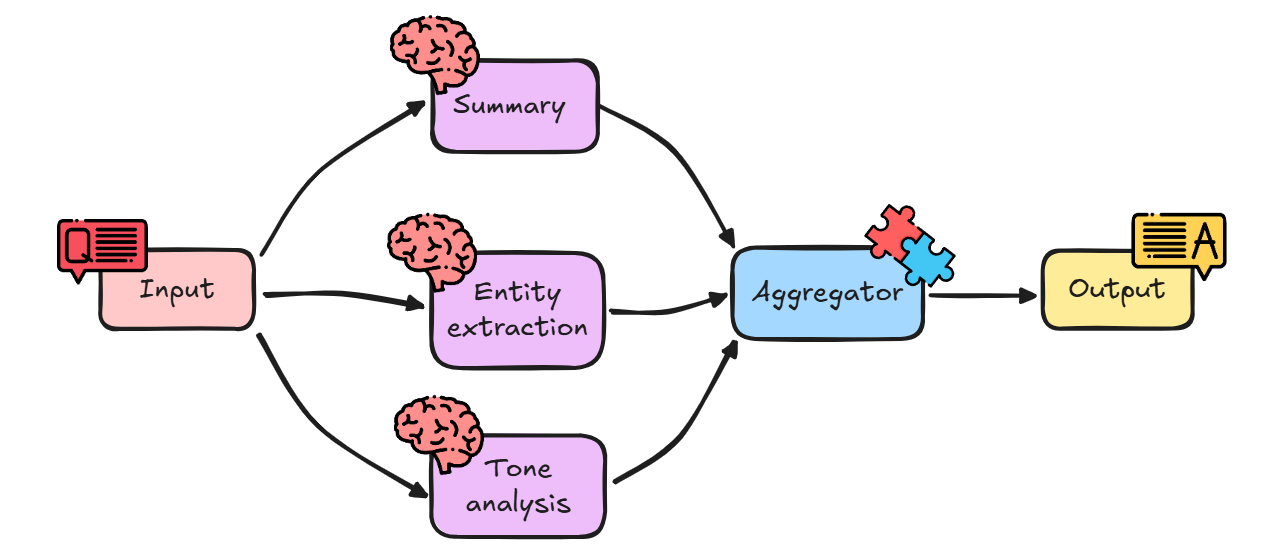
As an example, we will use the following news blurb:
“Quantum Leap Innovations (QLI), a tech startup based in Silicon Valley, announced yesterday it has secured $50 million in Series B funding. The round was led by Apex Ventures. CEO Dr. Aris Thorne stated the funds will be used to accelerate the development of their next-gen quantum computing platform, which aims to solve complex logistical problems.”
Let’s begin!
Setting the Stage
First, we need our LangChain tools and our LLM. We’ll also import Pydantic to define the exact structure we want for our extracted entities.
# Install necessary libraries if you haven’t already
# !pip install langchain-openai langchain pydantic

import os

from langchain_openai import ChatOpenAI
from langchain_core.prompts import ChatPromptTemplate
from langchain_core.output_parsers import StrOutputParser, JsonOutputParser
from langchain_core.pydantic_v1 import BaseModel, Field

# Set up your OpenAI API key (replace with your actual key or environment variable)
# If your key is not already set as an environment variable, uncomment and run the following:
# os.environ[”OPENAI_API_KEY”] = "your_api_key"

# Initialize our AI brain (the LLM) using gpt-4o
llm = ChatOpenAI(model=”gpt-4o”)
Interpretation:
ChatOpenAI(model=”gpt-4o”): This initializes our LLM.StrOutputParser: We’ll use this to get simple string outputs for our summary and tone.BaseModel, Field: These are from Pydantic. We’ll use them to create a “schema” or template for our entities.JsonOutputParser: This parser will take the LLM’s string output and automatically convert it into a Python dictionary that matches our Pydantic model.
📖 Book of the Week
If you are building, or want to build, real agentic systems in Python, this is a standout pick for your stack.
“Learn Model Context Protocol with Python” by Christoffer Noring

💡 A practical, end-to-end guide to Model Context Protocol (MCP) that shows you how to design, build, test, secure, and deploy interoperable AI applications using Python. You will move from first server and client to cloud deployment with tooling that works across LLM and non-LLM clients.
What sets it apart
It focuses on standardisation and interoperability with MCP, so your agents, tools, and hosts speak the same language. You get hands-on workflows for server and client development, clear security guidance, and real integrations with Claude Desktop and Visual Studio Code Agents.
You will learn to:
✅ Understand the MCP spec and core components
✅ Build MCP servers that expose tools and resources to many clients
✅ Describe host, client, and server capabilities for smooth interoperability
✅ Test and debug with interactive inspector tools
✅ Consume servers using Claude Desktop and VS Code Agents
✅ Secure MCP apps and mitigate common threats
✅ Deploy MCP apps using cloud-based strategies
Who should read this
🧠 Web developers, software architects, AI practitioners, and tech leads building scalable AI-integrated apps
📈 Product managers driving AI initiatives who need a shared language for teams
📚 Readers with basic web and AI knowledge who want production-ready patterns
Why it is useful for teams
A single, modern approach for distributed agentic AI apps
Professional guidance for both LLM and non-LLM clients
Print or Kindle purchase includes a free PDF eBook, plus downloadable code
If you are serious about MCP and agentic architectures, this is the resource that turns experimentation into reliable AI systems.
Now we are ready to build our parallel branches!
Branch 1: The Summary Chain
This is a simple chain to generate a one-sentence summary.
# Prompt for Summary
summary_prompt = ChatPromptTemplate.from_template(
    “Summarize the following article in one single, concise sentence.\n\nArticle:\n{article}”
)

# Define the summary sub-chain
summary_chain = summary_prompt | llm | StrOutputParser()
Interpretation:
This is a standard sequential chain. It takes an
articleinput, formats it with the prompt, sends it to the LLM, and parses the output as a string.
Branch 2: The Entity Extraction Chain
This branch is more advanced. We’ll define a Pydantic model for our desired output and use a JsonOutputParser to force the LLM’s response into that structure.
Keep reading with a 7-day free trial
Subscribe to Machine Learning Pills to keep reading this post and get 7 days of free access to the full post archives.